
A dusty little corner of the Internet: electronics, computer hardware and software, general aviation, 1980's Mopars, and related sundry.
Computing

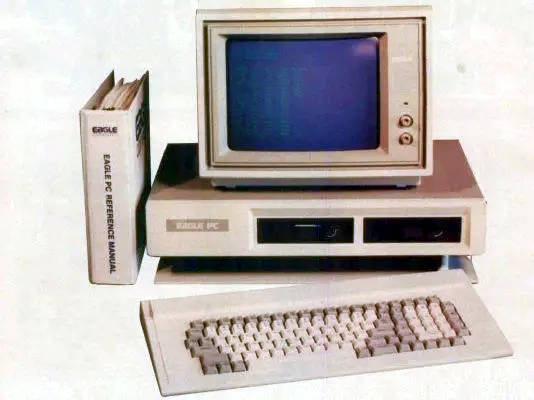 Computers have been a big part of my life, going all the way back to my childhood. Our first "family computer" was a Xerox 820 with dual, 8" floppy drives. It had a few games, including Zork of course, but was mainly a business machine with a Z80 processor running CP/M. I can still hear the specific noises the floppy drive made just before I was about to die in Zork. Later we acquired an Eagle PC-2, which was an 8088-based IBM PC clone. It had a lot of embedded peripherals, but only had 4 ISA slots for expansion. Finally we moved up to an AT clone that mostly replaced it. That machine went through many iterations (286@12, 286@16, 386SX@16, 386DX@32, etc), as it was mostly built out of scrap parts from my dad's work. The Spinrite screen was a common sight, as we limped the mostly-dead hard drives along.
Oppa BBS Style
Posted on March 25, 2026.
While messing around with different themes and fonts, I came accross a cache of PC text mode fonts at int10h.org. It inspired a light re-theme of my initial, basic style for this site that is a nod towards the good old BBS days. After some experimentation, I settled on this corrected EGA font. I haven't seen EGA text in a long time; it really takes me back.
Not a Blog
Posted on March 09, 2026.
 A few weeks ago, I started looking into what it would take to convert this WordPress-based site back into a static site using a static site generator. My main motivation was to end the update treadmill, constant security threats, and the fire hose of comment spam (unless I also pay for Akismet, of course). I post to my site in bursts and it can go years without any updates. This does not mesh well with WordPress. Although it can auto-update itself, the plugins need constant attention. I've had two security incidents, one where I had to restore from backups. Then there is the inevitable bit-rot that happens with abandoned plugins and my customized theme as major WordPress versions are released. The site is in need of a re-theme, but I'd rather do it once and be done.
I looked at a few options (Jekyll, Hugo, Astro) and settled on Eleventy. I liked its light weight, short list of dependencies, and the ability to control everything. I used wordpress-export-to-markdown to import the content from an export XML. It did some weird stuff to the front matter and downloaded images were scattered around, but the content was all there. I wrote some scripts to perform bulk reorganization of the markdown and image files and set out to create layout templates to reconstruct the basic functionality that WordPress provided. I dusted-off the old CSS theme from my original static site to use as a starting point. I'll get more playful with the look later. Overall, the initial import process was not that difficult.
I did still have to manually scrub every page and post to address formatting issues (floating images, image blocks, small galleries, etc) and broken internal links that were still pointing to things from the old static site. I also found that some old content went missing at some point. I tried to recover what I could from backups. I employed Claude to help with some of the reformatting, once I established a pattern. There were also hacks in the page content to work around WordPress limitations that I could now take care of directly in Eleventy (categories, subcategories, topics, etc). 11ty has proven to be a good fit for my needs, once I got my head around things like the data cascade and pagination. It's pretty intuitive, once you "get" it.
 WordPress was never the best CMS solution for my site. I shoe-horned my old static site into it by slightly-abusing the page hierarchy and category systems. It worked, but it was brittle. I chose it mainly because the project appeared to have "staying power" and I found I was able to bend it to my needs with a custom theme. I had hoped the built-in editor would reduce friction and induce more frequent updates from myself. It probably did, but not to the extent I was expecting. Markdown is much easier publish from than raw HTML, so it's still a step up from a pure, static website.
 I would also like the site be more "surfable" on the olde Internet. There are some signs of other creators wanting to break out of big tech's walled gardens and just make websites again. What better way than with some old-skool HTML and CSS. Webrings are apparently a thing again and Neocities somehow exists.
MythTV on a Raspberry Pi 4 (and 5)
Posted on March 27, 2025.
 So I finally bit the bullet and stood-up a MythTV front end on this Raspberry Pi 4 that had been hanging around the office for years. I had back-ordered one during the post-COVID supply chain crunch and it turned up many months (possibly more than a year) later, but I hadn't had the motivation to tackle the project. The Raspberry 5 announcement reminded me, so I ordered one and decided to try to get Myth working on the RP4 to start. There are some issues with the decoder and graphics software stacks on the RP5 at the moment, but I knew the RP4 would work.
I started with a degree of ignorance and built it in the same way that my other front ends are setup: using Christian Marillat's "dmo" packages from deb-multimedia.org and running the front end solo in an auto-login X session. This worked fine, but I was not getting good performance and could not seem to get the playback profiles setup the way I needed them. This led me down a rabbit hole; it turns out that a lot of the information in the MythTV Wikis is obsolete and does not apply to modern releases. For example, the recommendation is to use the OpenMAX decoder but no such decoder exists in MythTV 0.33+. The V4L2 decoder is there, but it is buggy and tends to lockup sometimes. The standard decoder drops frames and playback is jerky no matter how I set the read-ahead or fiddle with CPUs. I even tried overclocking it.
While searching for details, I kept seeing references to "mythtv-light". There is not a lot of explanation as to what it really is or why it is needed. What is so light about it? The wiki talks about the back end, but very little about the front end. What build flags are used? Why is it distributed via a random Google Drive? It all seemed very sketchy, so I wanted to avoid it. Eventually I found a separate git repository that contains packaging scripts for MythTV for a variety of platforms. In there were the scripts for mythtv-light, which seems to focus mainly on making installation as simple as possible from a single package without too many outside dependencies. It's not really there to support RPi, necessarily.
That said, in terms of the front end (which is all I care about), the RPi MythTV Light packages seem to enable three main things:
- QPA EGLFS rendering support.
- Specific decoder and OpenGL support for the Raspberry Pi.
- Disabled support for all unnecessary libraries and features.
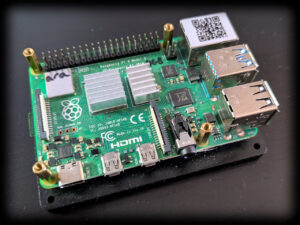 In terms of overall speed and efficiency, #1 is really important on the Raspberry Pi. By directly supporting Qt's EGL platform abstraction layer, there is no need to run X at all. Christian's dmo packages do not seem to support this, as they are build against Qt for X. #2 used to be very important, but that no longer seems to be the case. I believe this is because the version of ffmpeg that ships with Raspian is already setup to use whatever hardware decoders are currently supported on the RP4. The "Standard" decoder in Myth uses ffmpeg, so it "just works" without any special support for RPi-specific OpenMAX libraries. #3 is a nice-to-have, but with 8GB of RAM and X not running I don't know that is matters so much for the front end on the newer RPi's. I am getting very good performance on the RP4 and it can *just about* manage to decode 1080p HEVC with only an occasional skip when the bit rate gets too high. The CPUs are pretty busy, though.
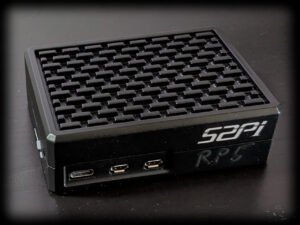 Proper cooling is a must or the SoC will hit thermal throttling. The above RP4 that I used as a test bed just has a base plate and a small heat sink on the SoC. It is not enough: the package temperature quickly rises to 60C under heavy load. There are a few "brands" that list a passively-cooled case on Amazon like the one pictured on the right (there are versions available for RP4 and RP5). It comes with thermal pads for all of the hot packages as well as the bottom of the PCB. The RP4 still gets toasty in mine, but it works well enough if left in the open air (i.e. strapped to the back of the TV). An RP5 is perfectly content in one of these.
I can't get access to edit the MythTV wikis, so I'll document my findings here:
-
The advice on how to auto-start the front end using cron is...not ideal. You can absolutely start it from the mythtv user account's .profile. You just need launch it only on a tty session and not for an ssh session. I have mythtv setup to auto-login to tty1, so that is easy. I have a few other configurable options in there, so I'll share those files here (you can rip out what you don't need).
-
For the issue of the keyboard not working (important if you use a remote that masquerades as a keyboard like I do), it is just a permissions issue. Add the mythtv user to the "input" group in /etc/groups and reboot. Do not start MythTV from /etc/rc.local as the Wiki suggests; that will run the front end as root, which is a bad idea.
-
The table showing how to setup the custom playback profile is out of date. There is no MMAL decoder. Use the "Standard" decoder instead. The V4L2 decoder is still listed, but it is not very stable in my experience. The other fields seem to work OK (4 CPUs, etc). Use the "Medium quality" deinterlacer, not the low quality one as I have read in a few places. I got horrible flicker with that one.
-
Increase the read-ahead buffer in the advanced settings to quell some of the random stuttering you might see, depending on your network's performance. I set mine to 400ms, but you can go higher.
-
There is no need to set the gpu_mem value in the firmware config. The defaults for RP4 and RP5 are fine. I am overclocking my RP4 as follows:
arm_freq=2147 over_voltage=6 gpu_freq=750
With that feather in my cap, I decided to try a Raspberry Pi 5. I've read a lot of conflicting opinions about its viability as a media player, but on paper it looks like a slam-dunk. As with everything on Linux, the issues seem to stem more from the software support and not so much from the hardware. The hardware is very capable. All of the above applies to the RP5 just fine, it just needs a few workarounds at the moment. These will probably not be needed in the future as support for RP5 matures.
- The front end will fail to start EGLFS. This is because the RP5 has two devices for the two GPUs and EGL needs to use the second one for 2D OpenGL. This can be addressed by passing the QPA layer a configuration file that specifies what device and display port to use. Mine is included in the above archive.
Once it's up and running, the RP5 works great as a front end. Watching the same 1080p HEVC video that made the RP4 get out of breath caused the RP5 to hardly break a sweat. I have not tried 4k yet, but it looks promising. Things should only get better as support for hardware acceleration improves.
MythTV Frontend Saga
Posted on March 26, 2025.
 I've been using MythTV for more than two decades now. I have separate front and back ends, as I've always had some sort of server running in the basement that is on all the time. Our first front end was an original Xbox with a Cromwell BIOS running Xebian. It was just powerful enough to do the job at standard definition and we already had the DVD remote accessory, so it was the perfect choice. The Xebian project was eventually abandoned and despite my efforts to keep Debian on the Xbox going, software bloat made the experience rather sluggish. A VIA EPIA M10000 Mini-ITX system took its place in our living room, while the Xbox moved into our bedroom. We used the EPIA for many years until the capacitors started to fail.
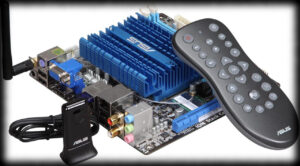 At this point, we had our first HDTV in our basement: a Sony Wega KD-34XBR960 (what an epic boat-anchor of a CRT that was). I was using an ASUS A8N-VM based PC for the front end so that we could watch HD videos and I wanted something to replace the EPIA system that could at least decode HD on our living room SD TV without issue. nVidia, with their ION 2 chipset, was the only show in town with efficient, hardware-accelerated H.264 decoding on Linux that MythTV also natively supported. I picked up an ASUS AT3IONT-I Deluxe and built a new front end around it. The CPU is quite modest (Intel Atom 330), but this board is all about the integrated GPU and nvdec support. It worked fantastically and as a bonus the "Deluxe" version came with a remote that sort-of worked (remote controls and MythTV are a whole other thing).
Eventually it came time to retire the old Xbox and turn it back into a game console: it was getting unusably sluggish and there was no hope of watching any HD programming on it (even though the TV was SD). I wanted to get another identical ION based board, so I picked up an ASUS AT5IONT-I Deluxe. It had a noticeably faster CPU (Intel Atom D550), but was otherwise pretty similar. We used these as our main front ends for many years.
Then came the troubles: nVidia started obsoleting their older drivers and the GPUs on these ION boards were not supported by any of the newer drivers. I managed to limp things along for a few more Debian OS upgrades until it was no longer possible to shoe-horn the required, ancient binary drivers into modern X servers. The open-source nouveau drivers were and still are pretty terrible and did not seem to support the decoder blocks at all. The only way to keep using these old systems was to freeze the OS versions. This only worked to a point, as it became difficult to support newer versions of MythTV on older version of Debian without doing custom builds...which I grew tired of. I ran into the same problem on some of my older laptops and other machines with nVidia GPUs as well. I will not be buying any new nVidia-based hardware for the foreseeable future, as I like to reuse old hardware for other purposes. nVidia has decided to make that impossible by keeping even their most obsolete hardware closed.
Then there was the issue of HEVC. The hardware decoder blocks on these boards were several generations too old to have any support for H.265 decoding and the CPUs were far too modest to handle software decode. My only choice is to avoid HEVC files entirely, but that is getting more and more difficult. H.265 is a far superior codec for dealing with HD and especially 4k, so it is kind of silly to try to keep dancing around the problem.
Finally there is the issue of power. Running all these machines is neither cheap nor wise. I should be using something more efficient that preferably shuts-down when the TV is off.
The obvious choice is the Raspberry Pi. I have been exploring this on and off for at least a decade. I bought a first-generation one when it first came out in 2012. It is a fun little toy that I used on a few little projects, but it didn't occur to me to try to use it as a MythTV front end. It seemed far too modest. I felt the same about the second-generation as well, though it turned out that with the right build options it could be made to work. While the Broadcom SoC is very capable, the issue has always been software support of the hardware acceleration blocks in Linux. Various licensing issues get in the way of a clean implementation. I did give it a shot with a Raspberry Pi 3, but I was not terribly impressed with it's performance even after jumping through the necessary hoops to get everything to work. My ION-based machines seemed to work better overall. I was never able to get enough performance to support H.265 decoding on the CPU, so I abandoned it.
Then came the Raspberry Pi 4. It seemed like it was going to be the hot ticket, but I was too late to the party. The post-COVID supply chain crunch made buying any Raspberry Pi a total nightmare. I tried for a long time to get one through legitimate channels, but eventually had to give up. I wasn't going to spend flipper dollars on eBay for one. Eventually, one of my back-orders got fulfilled and an RP4 turned up in the mail. I got busy with other things and forgot about it, so it sat on a shelf for a long time until....
Cinnamon Workspace Switcher Labels v6
Posted on February 07, 2025.
I recently switched back to Cinnamon from MATE on one of my machines and found I needed to reapply this patch again. I've updated it a bit to support all three modes of operation (workspace desktop preview, workspace labels, and the original useless numbers), selectable from the configuration dialog. You can also specify the button width in label mode, which can be nice if you want control over the aesthetics.
This patch works for version 6.x of cinnamon:
Download it and apply it thusly on a Debian-based system:
$ cd /usr/share/cinnamon/applets/workspace-switcher@cinnamon.org
$ sudo patch -p1 < ~/Downloads/workspace-switcher@cinnamon.org.v6.patch
patching file applet.js
patching file settings-schema.json
$
Then restart cinnamon with Alt+F2 and then "r" and enter.

