
A dusty little corner of the Internet: electronics, computer hardware and software, general aviation, 1980's Mopars, and related sundry.
Computing

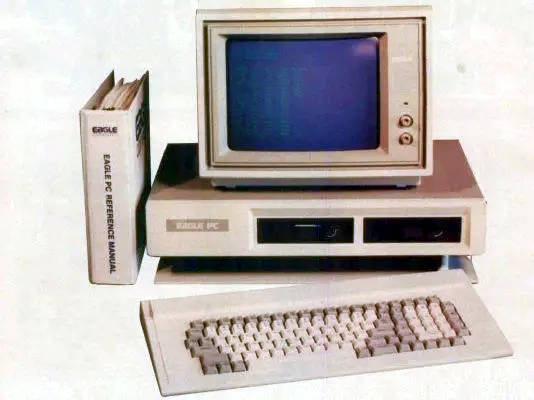 Computers have been a big part of my life, going all the way back to my childhood. Our first "family computer" was a Xerox 820 with dual, 8" floppy drives. It had a few games, including Zork of course, but was mainly a business machine with a Z80 processor running CP/M. I can still hear the specific noises the floppy drive made just before I was about to die in Zork. Later we acquired an Eagle PC-2, which was an 8088-based IBM PC clone. It had a lot of embedded peripherals, but only had 4 ISA slots for expansion. Finally we moved up to an AT clone that mostly replaced it. That machine went through many iterations (286@12, 286@16, 386SX@16, 386DX@32, etc), as it was mostly built out of scrap parts from my dad's work. The Spinrite screen was a common sight, as we limped the mostly-dead hard drives along.
Flying an Eaglercraft Server
Posted on January 23, 2025.
 This is a brain-dump of what I ended up doing to setup an "Eaglercraft Server". I've been running small Minecraft servers since around 2011. It was just for myself and a few of my work colleagues. I enjoyed experiencing MC coming out of beta and eventually growing up. We ended up with two servers, the original that started in Beta1.3 became a creative server and a "newer" 1.4 server running in survival mode. Over time, I eventually lost interest in the game but left the servers running. Like so many kids over the past decade or so, mine inevitably got into MC in a big way and still spend time on the old servers with their friends from time to time. I also stood up a third server for them to have a fresh start, since the old worlds are massive and had been generated using such old versions (there are some pretty weird chunk transitions in places). One day, my youngest asked me if I could help him setup an "Eaglercraft Server". Boy, what a rabbit hole that turned out to be...
I am by no means an expert here, but I wanted to document what I've learned. At its core, Eaglercraft is a Javascript port of the Minecraft client that can run in a web browser (I'll leave the reason why it exists and the origin of the name as an exercise to the reader). Since it was an unofficial port, the project came under fire by Mojang's current owners and had to go underground to some extent. The client is only currently available in specific versions: 1.5.2 and 1.8.8. There is no such thing as an "Eaglercraft server", per se. What is actually needed is a Java Edition server configured such that:
- It's preferably running in offline mode so that unauthorized users can connect...ah-hem.
- It's reachable by Eaglercraft clients from a web browser, preferably via port 80 if possible.
- It supports version 1.8 clients.
All of these present their own sets of problems, but all are solvable thanks to the amazingly active development community around Minecraft servers. I am assuming that the reader knows how to administrate a Linux server and has background knowledge of operating a Minecraft server. If not, there are lots of resources out there. My goal here was to fill in the missing big picture around what is required.
Authentication
One can, technically, login to an "online" (officially-authenticating) server from an Eaglercraft client by going through a number of convoluted steps to acquire the necessary credentials. Each player would need to do this on their own, which can be a bit of a pain for the less-technically-inclined.
All of that can be avoided by running in offline mode and setting up an authentication server that users can bounce-through when they first connect. There are plugins available for forked servers such as Forge, Spigot, and Paper that implement this: nLogin can provide authentication which will then use BungeeCord to tie the servers together. The authentication server needs to support the same client version(s) as the main server and don't forget to turn on the whitelist for both if they are going to run offline. The first time a player connects, they will be asked to set a password, which they then have to remember. nLogin offers tools for administrators to reset passwords, etc.
One annoying problem is the UUID generation that nLogin does will conflict with any online Java clients coming in, which then causes conflicts in the whitelist. nLogin has some settings for this, but each has caveats. One workaround is after adding an online player to the whitelist, look for the actual UUID they are using in the logs and manually edit the whitelist.json file to override the generated one for that player. You'll have to issue a "whitelist reload" command afterwards, but they should be granted access then. The same process needs to be repeated on the main server as well, if it is running a whitelist.
Proxy
To avoid exposing old server versions to the Internet, it is wise to put everything behind a proxy. The PaperMC project has a lightweight proxy server called Velocity that is a good candidate for this, as it supports BungeeCord and many of the required plugins including nLogin and Eaglercraft. The main and authentication servers can then be setup to bind only to localhost, preventing direct external connections. BungeeGuard can also be used as a further protective step.
Note that when using nLogin, the plugin is actually resident on the proxy and not the authentication server. This can be a little bit confusing when trying to manage the plugin from the local console. One has to connect to the proxy console, not the authentication server console.
Server
The primary server that players will play on needs to support 1.8 clients. There are two ways to approach this:
- Run an actual 1.8 server.
- Run a more modern server with ViaVersion plugins.
The first approach is the simplest, but it doesn't scale well thanks to the many bugs present in Minecraft 1.8. It's fine if playing among friends that behave themselves or that all agree to use the same exploits. It can also be more fun and nostalgic to play this way, but it can also go horribly wrong. At the very least, use a forked server project for this.
Otherwise, it is probably better to run a newer server and support older clients via ViaVersion. A nice compromise might be to run a 1.12 server, which predates Update Aquatic but fixes a lot of the flaws of earlier servers. This requires the installation of the following plugins:
- ViaVersion - allows newer clients on older servers for those connecting from a modern Java client.
- ViaBackwards - allows older clients on newer servers.
- ViaRewind - expands ViaBackwards support to really old clients, including 1.8 that EaglerCraft needs.
- ViaRewind-Legacy-Support - fixes a number of glitches and bugs that 1.8 clients would normally experience.
Once everything is setup, players will connect to the proxy which will connect them to the authentication server. nLogin can be setup a few different ways, but again be sure to turn on the whitelist. Once authenticated, players are connected to the main server.
Still a Blog?
Posted on January 18, 2025.
 Wow, so it's been almost a decade since I last posted here. I've switched hosting situations multiple times in the intervening years and this site has suffered its fair share of bit-rot along the way. I actually took it down at one point, as I assumed no one would notice. It turns out there are a number of forums and whatnot that direct links to files in here, so I brought it back after receiving some frantic emails. WordPress was hopelessly out of date and when I jumped to the latest release, it broke this ancient theme, a number of plugins, and there were also some problems with the DB due to its age (using a very old storage engine). I thought all was lost, but somehow got it going again. I'm sticking to my guns on this highly dated-looking theme and I absolutely hate the new WordPress editor, but I found this plugin called "Classic Editor" that has saved the day.
So yeah, why am I even posting on here when I know no one will ever read it? Mostly for my own posterity, I guess...and maybe the web crawlers will find these posts and show them on page 6 in their search results. I've learned a valuable lesson over the past couple of decades: letting a few huge social media corporations hoover-up all of the discourse on the Internet and move them into their walled gardens has effectively ruined it. A lot of the hobby-related discussions that had moved from email lists into Internet forums back in sepia-times have now moved into Facebook or Reddit. Many of the forums still physically exist, but they're mostly cobwebs and crickets and/or a fire hose of spam with maybe a few gray beards lurking here or there. Facebook Groups are a terrible replacement for something like a forum, as it's impossible to find anything and the same questions get asked over and over. They have no reason to change it, as all they care about is engagement. Alas, this is where we are now and I don't see it ever turning around.
 I stopped using Twitter about 5 years ago, as my feed slowly morphed into an AI stream of consciousness. I was never into micro-blogging, but I used it as an RSS feed of sorts for the topics and publishers I was interested in. Since it was no longer capable of performing that function, I started playing around with things like Mastodon...even setting up my own instance. It kind of did what I wanted, but like so many before it (Diaspora, GNU Social, etc) it didn't really work because no one was there generating content. It's the age-old problem of adoption. That all changed in 2022 and now I find Mastodon does pretty much what I want thanks to relays and folks just plain-old posting there. I do have a Bluesky account and that place feels a lot like Twitter did back when it was useful. But I think we know the inevitable result will be the same once the VC money runs out. I've also been playing around with Pixelfed and, thanks to the train wreck over at Reddit, Lemmy. Something to be a bit excited about, at the very least.
MythTV and the Adesso Vista MCE Remote Control
Posted on August 16, 2023.
 I am documenting here, for posterity, my journey while trying to maintain support for the Adesso Vista MCE remote control on my MythTV front ends. Yes, I still use Myth and I believe I have had a backend running continuously since 2004, possibly earlier. I've had plenty of misadventures with it over the years, but the one thorn that has always been in my side is IR remote control support. In the early days, this was pretty clumsy as it required the use of LIRC: an out-of-tree set of drivers to support IR receivers through a serial interface. I would usually use it with some generic universal remote control or a remote that came with a video capture card. Once it was working, it usually worked fine for a while. However when it came time to perform an OS upgrade, the remote would always be broken because of issues between LIRC and the kernel. LIRC went through several generations of config changes as well, so my painstakingly-created lircrc would often not work even when I managed to get LIRC itself working. Eventually I threw in the towel and bought a bespoke MCE remote that was supposed to "just work". There were a number of these available that were designed to work with Windows Media Center. I chose...poorly.
 Originally, the Adesso Vista MCE Remote Control was supported in MythTV via the mceusb LIRC driver. Since it was being supported through LIRC, keys could easily be remapped in the usual way. Of course, it wasn't quite that simple as the usbhid driver always wanted to grab the device before mceusb could find it (it presents itself as a HID keyboard). The workaround was to blacklist usbhid, which created other problems but I didn't care about other HID devices on my frontends. Even so, LIRC always remained frail; the drivers were a pain to port and compile, and the whole thing would still break somehow every couple of years at the next Debian upgrade.
Eventually, the mceusb driver was abandoned and the usbhid driver itself became the only way to support the Vista MCE. It mostly worked, as the default keymap for it had been improved. Most incorrect keys could be remapped within MythTV itself. However for technical reasons, there are two very important keys that can only be remapped via ir-keytable triggered by udev rules: ESC (the back key) and M (to bring up the menu). These rules did the trick:
KERNEL=="event*",SUBSYSTEM=="input",ATTRS{idVendor}=="05a4",ATTRS{idProduct}=="9881",IMPORT{program}="input_id %p"
KERNEL=="event*",SUBSYSTEM=="input",ATTRS{idVendor}=="05a4",ATTRS{idProduct}=="9881",ENV{ID_INPUT_KEYBOARD}=="1",ACTION=="add",SYMLINK="input/irremote0", RUN+="/usr/bin/ir-keytable --set-key=0x70029=KEY_BACKSPACE,0x7002a=KEY_ESC --device %N"
KERNEL=="event*",SUBSYSTEM=="input",ATTRS{idVendor}=="05a4",ATTRS{idProduct}=="9881",ENV{ID_INPUT_MOUSE}=="1",ACTION=="add",SYMLINK="input/irremote1", RUN+="/usr/bin/ir-keytable --set-key=0x90002=KEY_M --device %N"
This worked fine until one day the ir-keytable tool dropped support for the --device option for reasons that are not clear. Sean Young claimed it did not work and was "misleading", however there are no apparent alternatives since the remote is handled as a straight HID device and does not present itself as an rc device anywhere in the kernel. The --device option is literally the only way to get it to work.
As with everything related to IR, the flavor of the month to support this thing has likely shifted to some other subsystem. For now, I am pinning ir-keytable to the version from Debian 11 "Buster" (you can also use "apt-mark hold"). This still works as of the upgrade to Debian 12 "Bookworm", but I suspect that I will have to forward-port --device support back into the tool at some point or find some other way to reach the device.
Package: ir-keytable
Pin: release n=buster
Pin-Priority: 1000
This workaround seemed to work fine until I noticed a timing issue in udev causing the RUN command to fail in some cases where the device node had not quite been created by the kernel yet. To work around this, the calls to ir-keytable were moved to a script that introduces an artificial delay before actually calling ir-keytable. The udev rules were adjusted thusly:
KERNEL=="event*",SUBSYSTEM=="input",ATTRS{idVendor}=="05a4",ATTRS{idProduct}=="9881",IMPORT{program}="input_id %p"
KERNEL=="event*",SUBSYSTEM=="input",ATTRS{idVendor}=="05a4",ATTRS{idProduct}=="9881",ENV{ID_INPUT_KEYBOARD}=="1",ACTION=="add",SYMLINK="input/irremote0",RUN+="/usr/local/bin/mce-remap keyboard %N"
KERNEL=="event*",SUBSYSTEM=="input",ATTRS{idVendor}=="05a4",ATTRS{idProduct}=="9881",ENV{ID_INPUT_MOUSE}=="1",ACTION=="add",SYMLINK="input/irremote1",RUN+="/usr/local/bin/mce-remap mouse %N"
I hate this remote. I suppose I could buy a different one, but I don't see the point as the entire concept of a DVR is waning. Myth's days are numbered.
Cinnamon Workspace Switcher Labels
Posted on September 16, 2015.
I've been using Linux Mint for years now. Like a lot of people, I switched around the time that GNOME and Ubuntu set out to gaslight the world about how everything about their workflows have been wrong for all this time. I tried GNOME Shell, but with each passing release they stripped more and more useful functionality from it. Linux Mint kept the GNOME 2 torch lit and eventually offered both MATE (a GNOME 2 fork) and their own Cinnamon (GNOME 3 based) desktop variants. I liked what Cinnamon had to offer, but it was a bit buggy and I so stuck with MATE instead.
Cinnamon continued to improve and at some point I decided to switch over to it. I was able to recreate most of my workflows, but one thorn in my side was that at some point they replaced the workspace names in the switcher with these useless numbers. It was either that or a tiny thumbnail of the desktop. I use workspaces in a very specific way that helps me keep my trains of thought in order and the naming convention is a big part of that. Thinking this was just temporary, I modified the JavaScript to bring back the names instead of numbers and kept reapplying the patch every time Cinnamon got upgraded.
Here we are years later and the silly thing is still broken! I sent the patch to dev that made the original change, but they didn't take it because it has a one major flaw: the width of the buttons is hard-coded. I suspect this is the real reason behind why the simple view only shows the number. It's tricky to know how to set the width, as it depends on the font being used, DPI, etc. I assumed there was some "proper" way to do this, but I guess not?
Anyway, I'm posting the patch here in case anyone wants it. If you want wider/narrower buttons, just change the constant at the top.
New Host (again)
Posted on August 12, 2015.
Things changed with our previous data center such that it is no longer a viable option. Thanks again to iMav for hosting me previously. It was great while it lasted.
I've moved everything again to my own virtual private server over at 1&1. I'm done with shared virtual web hosting, as the database performance is horrid and the setup limitations are annoying (I need to host several sites). So far, it has been working great....

